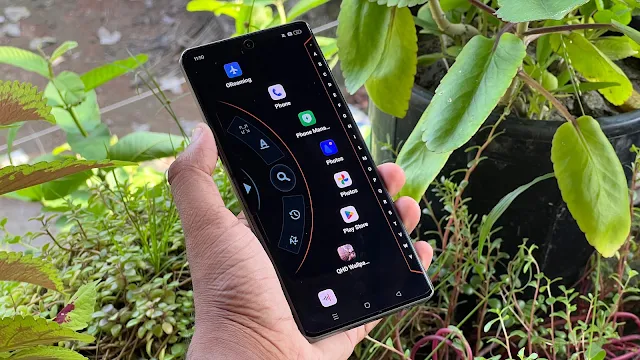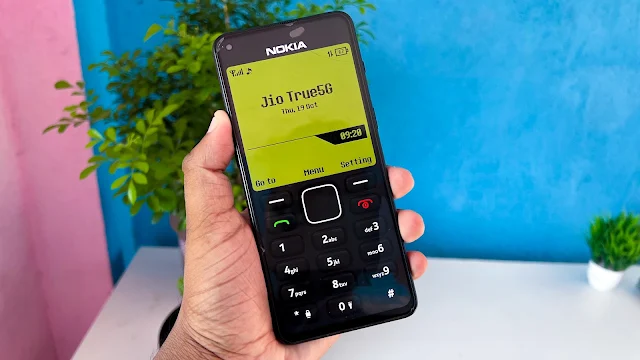
The world of smartphones has evolved rapidly, offering powerful processors, high-resolution displays, and countless smart features. However, many people still miss the simplicity and nostalgia of classic mobile phones. One of the most memorable devices from that era is the Nokia 1280, a phone loved for its durability, long battery life, and easy-to-use interface.
If you’ve ever wanted to relive those memories, Nokia 1280 Launcher makes it possible. This Android launcher transforms your modern smartphone into a device that looks and feels remarkably similar to the iconic Nokia 1280. From the classic home screen to the familiar keypad-style interface, it recreates the vintage mobile experience while still allowing you to enjoy the power of your Android device.
In this article, we’ll explore everything you need to know about the Nokia 1280 Launcher, including its features, installation process, advantages, and why it’s worth trying.
What is Nokia 1280 Launcher?
Nokia 1280 Launcher is an Android launcher application that recreates the appearance of the legendary Nokia 1280 mobile phone. Once installed, your smartphone adopts the classic Nokia-inspired interface, complete with retro menus, large keypad buttons, and vintage themes.
The launcher is designed for users who love nostalgic mobile designs but don’t want to give up the convenience of a modern smartphone.
Whether you’re using it for fun or simply enjoy retro technology, this launcher offers a unique experience unlike traditional Android launchers.
Why is the Nokia 1280 Still So Popular?
The original Nokia 1280 became famous for several reasons:
- Extremely durable build quality
- Long-lasting battery life
- Easy-to-use keypad
- Lightweight and compact design
- Simple interface suitable for everyone
- A nostalgic reminder of the early mobile phone era
The Nokia 1280 Launcher captures this timeless design and brings it back to modern Android devices.
Key Features of Nokia 1280 Launcher
1. Authentic Classic Nokia Interface
The launcher recreates the look of the original Nokia 1280 with remarkable attention to detail.
Features include:
- Classic monochrome-style display
- Large keypad-inspired interface
- Traditional navigation menus
- Vintage wallpaper styles
- Old-school mobile appearance
It gives your smartphone a completely different personality.
2. Retro Themes & Custom Icons
Although inspired by the original phone, the launcher still allows basic customization.
You can:
- Change icon styles
- Select different classic themes
- Customize colors
- Modify wallpapers
- Personalize the interface while maintaining the Nokia look
This lets you enjoy nostalgia with a personal touch.
3. Custom Phone Branding
One interesting feature is the ability to customize the phone name displayed on the interface.
Instead of showing “Nokia,” users can replace it with any name they prefer, making the launcher even more personalized.
4. Preview Before Applying
Not sure if you’ll like the classic interface?
The launcher provides a preview mode so you can see how your phone will look before setting it as the default launcher.
This makes it easy to test the experience without permanently changing your home screen.
5. Lightweight & Smooth Performance
Unlike many heavy Android launchers, Nokia 1280 Launcher is designed to be lightweight and responsive.
It consumes minimal system resources, ensuring smooth performance on both newer and older Android devices.
Why Use Nokia 1280 Launcher?
There are several reasons why Android users love this launcher:
- Recreates the nostalgic Nokia experience.
- Gives your smartphone a unique retro appearance.
- Easy to install and configure.
- Simple interface suitable for all age groups.
- Lightweight and battery-friendly.
- Perfect for users who enjoy classic mobile designs.
Whether you’re a longtime Nokia fan or simply want something different from the usual Android interface, this launcher is worth trying.
How to Install Nokia 1280 Launcher
Installing the launcher is quick and simple.
Step 1
Open the Google Play Store on your Android smartphone.
Step 2
Search for Nokia 1280 Launcher and install the application.
Step 3
Open the app after installation.
Step 4
Grant the required permissions.
Step 5
Set Nokia 1280 Launcher as your default home launcher.
Within seconds, your smartphone will transform into a classic Nokia-inspired device.
How to Remove Nokia 1280 Launcher
If you want to switch back to your original Android interface:
- Open the Nokia 1280 Launcher.
- Tap the menu button.
- Select Exit Launcher.
- Choose your original Android launcher as the default launcher.
Your phone will immediately return to its normal home screen.
Advantages
- Brings back the classic Nokia 1280 experience.
- Extremely simple and easy-to-use interface.
- Lightweight and fast performance.
- Attractive retro design.
- Minimal battery usage.
- Easy installation process.
- Suitable for all Android users.
Limitations
- Limited advanced customization compared to modern launchers.
- Some features available on current Android launchers are missing.
- Designed mainly for nostalgia rather than productivity.

Is Nokia 1280 Launcher Worth Installing?
If you’re someone who appreciates retro mobile phones or wants to experience the charm of the legendary Nokia 1280 once again, this launcher is an excellent choice.
It combines nostalgic design with the convenience of modern Android, creating a fun and unique smartphone experience.
While it isn’t intended to replace feature-rich launchers, it excels at delivering a clean, lightweight, and memorable classic interface.
Final Verdict
Nokia 1280 Launcher is a perfect launcher for users who want to relive the golden era of mobile phones. Its classic design, smooth performance, and nostalgic interface make it stand out from ordinary Android launchers.
Whether you’re looking to surprise your friends, enjoy vintage technology, or simply give your smartphone a fresh retro makeover, Nokia 1280 Launcher is definitely worth trying. It successfully blends the timeless appeal of one of Nokia’s most iconic phones with the power and flexibility of today’s Android devices.